

Cut IPTV Encoding Delay with the Right Codec Choices
How to Reduce Live IPTV Encoding Delay with the Right Codec Choices
Live IPTV encoding delay can ruin the viewer experience, especially in fast‑moving sports or breaking‑news environments. Understanding the sources of live IPTV encoding delay is the first step to eliminating it. This article shows how to understand the codec choices that drive that delay and how to keep it as low as possible.
What causes live IPTV encoding delay?
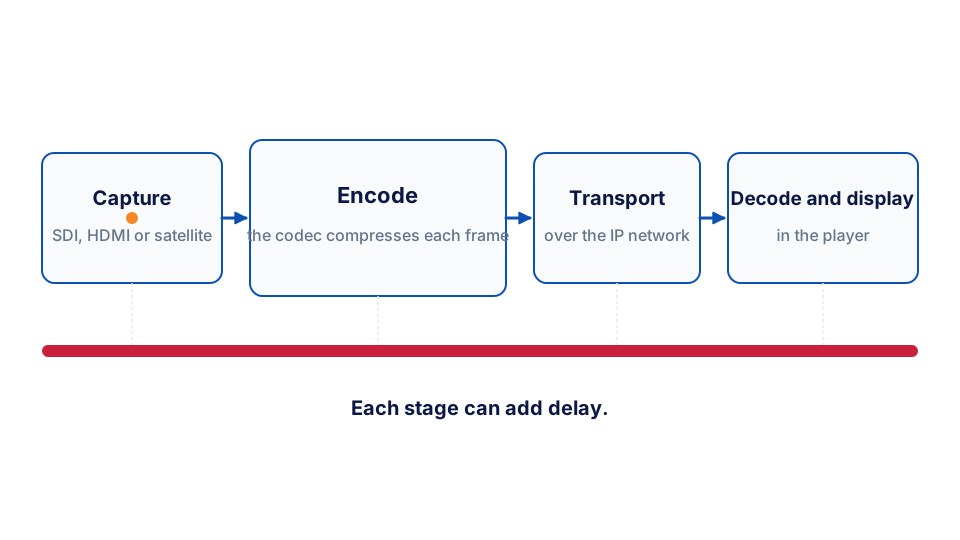
Encoding delay is introduced at several stages of the video pipeline. First, the source video is captured from SDI, HDMI or satellite feeds. Next, the raw frames are handed to a codec, which compresses them for transport over IP networks. Finally, the compressed stream travels through the network, is packaged for delivery, and is decoded by the decoding device at the screen. Each stage can add latency, and the codec itself is a major factor because it determines how much processing is required per frame.
Which codecs are best for low‑latency live streaming?
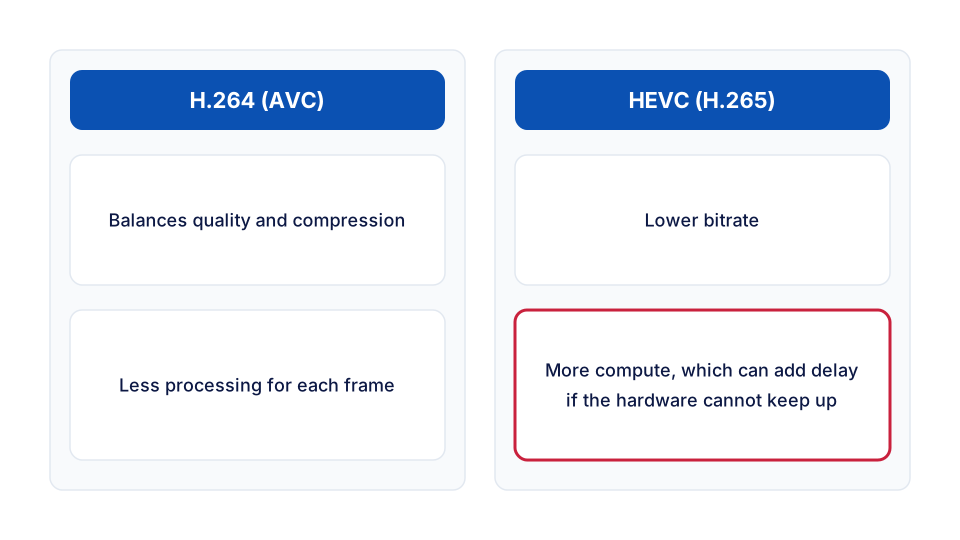
Historically, MPEG‑2 was used for broadcast, but its high bitrate and older compression make it unsuitable for modern low‑latency needs. H.264 (AVC) became the workhorse for IPTV because it balances quality and compression efficiency. Newer codecs such as HEVC (H.265) promise lower bitrates, but they require more compute power, which can increase encoding delay if the hardware cannot keep up. The sweet spot is to pick a codec that matches the processing capability of your server while still delivering the required visual quality.
How to evaluate a codec for your deployment?
- Processing overhead – Measure the CPU or GPU cycles needed per frame. A codec that fits within the available head‑room will keep the pipeline moving.
- Compression efficiency – Higher efficiency means lower bandwidth, reducing network queuing delay.
- Hardware support – Many capture‑and‑encode servers include ASICs or GPU blocks for H.264 and HEVC. Using a codec that aligns with that hardware avoids costly software fallback paths.
- Low‑latency profiles – Some codecs offer ultra‑low‑latency settings (e.g., H.264 “ultra‑low‑latency”), which trade a little quality for faster encoding.
Running a test capture of a typical source, encoding with each candidate codec, and measuring the end‑to‑end delay from source frame to displayed frame gives a concrete comparison.
What role does the capture and encoding server play?
The capture server must ingest video, apply the chosen codec, and push the stream onward without buffering. The Vivo server is built for 24/7 operation and low latency. It handles broadcast TV capture, satellite integration, and multi‑channel SDI/HDMI inputs, providing a reliable backbone for live IPTV workflows.
Worked example: measuring real‑world latency
Take a stadium scoreboard feed captured over HDMI. Burn a time‑code overlay into the source that shows the wall‑clock time to the frame. Encode it with an H.264 low‑latency preset, send it over SRT, and photograph the source monitor and the screen fed by the decoding device in a single shot. The difference between the two time‑codes is your end‑to‑end delay.
Then repeat the test with HEVC on the same hardware and compare. If the encoder has no hardware acceleration for HEVC it has more work to do on every frame, and the delay will show it. The figures that matter are the ones you measure on your own equipment. Pairing the right codec with the solution can cut live IPTV delay significantly.
Trade‑off: bitrate versus delay
Lower‑bitrate codecs reduce network load but often require more complex prediction, which can add processing time. When the network is already provisioned for the required bitrate, favour a codec that minimises compute, such as H.264 low‑latency, to keep delay down. If bandwidth is scarce, HEVC may be justified, but you should provision additional hardware acceleration to keep the latency penalty acceptable.
Practical steps to reduce live IPTV encoding delay
- Choose a codec aligned with your hardware – If your server has H.264 ASICs, stay with H.264 low‑latency profiles. If you have newer GPUs, consider HEVC with a real‑time preset.
- Enable low‑latency encoder settings – Disable B‑frames, use short GOP sizes, and enable intra‑refresh to keep frame dependencies short.
- Optimise network transport – Prefer protocols designed for low delay, such as SRT or RTP, and avoid unnecessary transcoding stages.
- Monitor the pipeline – Deploy telemetry that reports per‑stage latency so you can spot bottlenecks quickly.
- Scale resources appropriately – If the encoder consistently runs at high CPU utilisation, add another encoding node or offload to a hardware accelerator.
How to measure latency in the field?
Place a time‑code overlay on the source video, capture the same overlay on the screen fed by the decoding device, and calculate the difference. Tools like FFmpeg can extract timestamps, and specialised IPTV analysis utilities can report end‑to‑end latency in real time.
Network jitter and packet loss can also inflate perceived delay. Implementing small receiver‑side buffers can smooth out jitter, but they add a fixed latency component that must be balanced against the need for smooth playback. Adaptive bitrate streaming (ABR) helps by selecting higher‑quality streams only when the network can sustain them, reducing re‑buffering events that spike latency.
When to consider a different architecture?
If even the most efficient codec and hardware still produce noticeable delay, you may need to rethink distribution. Edge‑based encoding, where a lightweight encoder sits close to the capture point, can shave off network round‑trip time. Alternatively, a cloud‑based encoding service that scales on demand can keep processing queues short.
Frequently asked question
What should I ask my vendor next?
Ask whether the capture and encoding platform offers dedicated ASIC support for the codec you plan to use, and whether it provides a low‑latency profile that disables B‑frames. Knowing this lets you confirm that the hardware can meet your latency targets without extra compute resources.
Summary and next steps
Live IPTV encoding delay is largely a function of codec choice, hardware capability, and pipeline configuration. By selecting a codec that aligns with your server’s hardware, enabling low‑latency profiles, and monitoring each stage, you can keep the delay to a minimum and deliver a smooth viewer experience. The Vivo server also offers multi‑channel input support for complex deployments. It is designed for continuous operation and the performance needed for live content.
Ready to evaluate your workflow? Visit the Vivo product page for details, and explore real‑world examples in the case‑studies section.